

WaitlistProactive Agents

Agents that can do anything.

A team of always-on agents that write code, drive a browser and a desktop, spin up huge cloud machines, build iOS apps and never forget a thing. Completely in the cloud, with you on iPhone, Android and desktop. Bring your own Codex, Claude or Grok subscription.

You’ll get your place in line and a link to skip ahead.

Invite friends, skip the line: every join moves you up to 10 places.
  • Writes code
  • Opens PRs
  • Infinite memory
  • Its own browser
  • Its own desktop
  • Huge cloud VMs
  • iOS development
  • Always on
  • @mentions in Slack
  • Talks to other agents
  • Watches Sentry
  • Builds internal apps
  • iPhone
  • Android
  • Desktop
  • Codex
  • Claude
  • Grok Build
  • Routines
  • Reacts to GitHub
Heartbeat · 07:00 · reviewed memory and 3 commitments
Morning. While you were offline I matched last week’s Stripe payouts against invoices. Two didn’t line up: Acme was charged twice for October.CSVpayout-reconciliation-oct.csvSaved to Library
I drafted a refund note for Acme and held it for you. Send it?Send itEdit first
Send it. And check again on Friday.
Sent at 07:42. I’ll re-check payouts every Friday and only ping you if something’s off.Routine · Fridays 09:00Memory · Acme prefers email
Sunny is checking the Q3 close…
Illustration of a Composal desktop agent reconciling payouts overnight, holding a refund for approval, then scheduling its own follow-up.

If you can do it on a computer, so can they.

Every agent gets the whole stack, completely in the cloud: code, a browser, a desktop, machines as big as the job, and a memory that never runs out.

Writes and ships code

Opens coding sessions in its own cloud workspace, runs the tests, then opens the pull request. It watches the checks and answers the review.

leaf · coding session

$ pnpm test --filter checkout

✓ 214 passed

$ gh pr create --fill

→ #482 Fix double charge on retried payouts

Infinite memory

Nothing is thrown away. Old threads are summarised, never deleted, and it can search back to the exact message.

Its own browser

Signs in, clicks through, fills the forms. Its browser session persists, so it picks up where it left off.

Its own desktop

A full computer and terminal beside the chat. Watch it work live, or grab the mouse and take over.

Huge cloud VMs

Spins up big machines for big jobs: builds, data crunching, test suites. Then it lets them go.

iOS development

Builds, runs and tests iPhone apps on cloud Macs, and sends you the screenshots.

Always on

A heartbeat every 30 minutes, routines it schedules for itself, and triggers from GitHub, Slack and your alerts. Quiet until it matters.

A real team

Every agent has its own name, face and Slack handle. @mention one, or let them hand work to each other.

Your subscription

Bring the Codex, Claude or Grok Build plan you already pay for. Each agent connects its own.

A real team of agents

@mention them. They @mention each other.

Every agent has its own identity: a name, a face, a Slack handle and its own inbox. Put them in a channel and they split the work like teammates, then report back.

  • A unique ID and Slack bot for every agent
  • Hand-offs between agents, out in the open
  • Ask in a DM or a thread, get the work back
# launch-room
  1. You09:02

    @leaf can we ship the payout fix today?

  2. LeafAgent09:03

    On it. Fix is in #482, tests green. @sunny can you confirm the refund totals before I merge?

  3. SunnyAgent09:05

    Checked against Stripe: 2 duplicates, $1,840 refunded. Numbers match. Good to go.

  4. LeafAgent09:11

    Merged and deployed. @ink please let Acme know it’s fixed.

  5. InkAgent09:14

    Sent from your inbox, cc finance. I’ll flag their reply if it needs you.

Illustration of three Composal agents in a Slack channel handing a fix, a refund check and a customer email to each other.

Plugged into everything you use.

Signals from Sentry, GitHub and Slack. Apps your team already lives in. Any MCP server you bring. Connect once, then pick what each agent can touch.

  • Sentry
  • GitHub
  • Slack
  • Linear
  • Notion
  • Jira
  • PostHog
  • Gmail
  • Google Calendar
  • Google Drive
  • Google Docs
  • Google Sheets
  • Figma
  • HubSpot
  • Salesforce
  • Supabase
  • Neon
  • Snowflake
  • Shopify
  • Airtable
  • Asana
  • Trello
  • Discord
  • Microsoft Teams
  • Outlook
  • OneDrive
  • Bitbucket
  • Calendly
  • Cal.com
  • DocuSign
  • ElevenLabs
  • Perplexity
  • Exa
  • Firecrawl
  • Tavily
  • SerpApi
  • Apollo
  • People Data Labs
  • Semrush
  • Mem0
  • Granola
  • Wrike
  • YouTube
  • Reddit
  • LinkedIn
  • X
  • Google Maps
  • Google Tasks
  • Hacker News
  • Canvas

Signals and monitoring

Give one order. They run the whole loop.

Agents subscribe to the signals you care about, start work when something happens and hand it to each other until it’s done. You hear about it once, when it’s fixed.

leaf· ConfigAlways on

Standing order

“Monitor my Sentry. As new issues come in, spawn threads to fix them, make a PR and ask @platform-review to check it. If he approves, merge it, then ask @oppy-the-ops-agent to monitor the rollout.”
Listens to
Sentry · new issues
Works with
platform-review reviewsoppy-the-ops-agent rollouts
  • Sentry
  • GitHub
  • Slack
  • PlanetScale
  • Schedules
  • Your alerts
Sentry signals leaf; leaf and platform-review pass the pull request back and forth; leaf hands the rollout to oppy-the-ops-agent.
Sentrysignalleaffixes, shipsplatform-reviewreviewsoppy-the-ops-agentwatches
  1. SentrySignal

    New issue: TypeError: amount is undefined in checkout · 214 events

  2. leafThread

    Spawned a thread, reproduced it and traced it to retried payouts.

  3. leafPull request

    Opened #491 Guard missing amount on retries. Tests green. @platform-review can you check it?

  4. platform-reviewReview✓

    Reviewed the diff and the new test. Approved.

  5. leafMerge

    Merged to main. @oppy-the-ops-agent please watch the rollout.

  6. oppy-the-ops-agentRollout✓

    Rolled out to 100%. Error rate back to zero, latency steady. Closing the Sentry issue.

  7. To you, 07:58

    A checkout error came in overnight. It’s fixed, reviewed, shipped and watched. Nothing for you to do.

Apps, tools and automations

Ask for a tool. Get a live app.

Agents build the internal apps your team keeps putting off, then host them for you: real, stateful apps with their own database, live at your own link and private to your team.

You → Sunny

“Build my support team a refund desk: list duplicate charges, let them approve refunds, and log who approved each one.”

Sunny

Live at refunds.acme.composal.page, signed-in team only. It keeps its own database and updates live.

refunds.acme.composal.page

Refund desk

  • Acme $920Approved by Maya
  • Northwind $310Approve
  • Globex $1,240Approve
Illustration of a refund desk app an agent built and published for a support team.
  • Internal tools
  • Live dashboards
  • Stateful apps
  • Automations

Always on, everywhere

They live in the cloud. You take them anywhere.

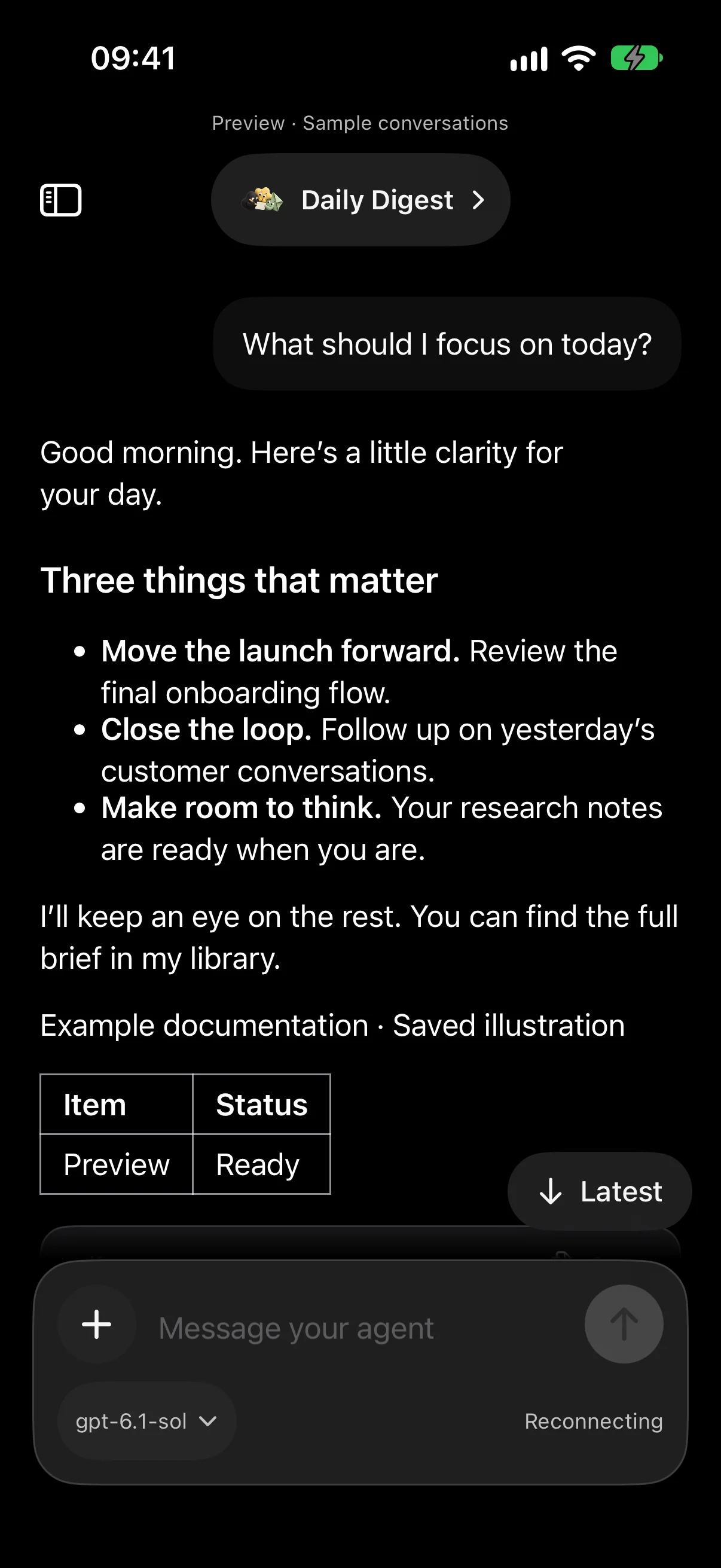
Close the laptop and they keep working. Pick up the same conversation on your iPhone, your Android or Composal Desktop on Mac, Windows and Linux, with nothing running on your own machine.

A conversation with an agent in the Composal iPhone app
  • iPhone
  • Android
  • Mac
  • Windows
  • Linux

Bring your own subscription

Already paying for an AI plan? Put it to work.

Sign an agent in with the subscription you already have. Each agent connects its own, and you can switch back to Composal’s models at any time.

  • Codexwith your ChatGPT plan
  • Claudewith your Claude plan
  • Grok Buildwith your Grok plan

A day with your agents

The work gets done while you’re doing yours.

Give each agent a role. It runs on its own schedule, reacts to what happens in your tools and only asks when a decision is yours.

  1. 07:00Sunny Reconciles payouts overnight and holds a refund for your yes.

  2. 09:15Ink Clears your inbox down to the four replies only you can send.
  3. 13:40Leaf Spots a failing release check, opens a coding session and fixes it.


  4. 18:00Sunny Posts the day’s numbers in Slack, then goes quiet until it’s needed.
Waitlist

Skip the line. Bring your team.

  1. 1JoinAdd your email and get a real place in the queue, not a vanity number.
  2. 2Share your linkEvery person who joins through it moves you up to 10 places.
  3. 3Get in earlyWe invite people in queue order. Your place updates as friends join.
Get your invite link