 Composal
GitLab
Connect GitLab.com or Self-Managed GitLab to Verify. Configure merge request testing, CI previews, Review Apps, browser evidence, and merge protection.
Contents
Test the user journeys affected by a GitLab merge request, using its exact source commit, and keep one results note and commit status current. Configure the project once, then run automatically on updates or request a manual rerun.
Connect and configure a GitLab project
You need GitLab and Verify enabled for your organization and administrator access in Composal. GitLab.com projects use the same scenario selection, preview admission, run history, findings, recordings, and feedback as GitHub PRs.
Connect GitLab through Repositories → Import → GitLab, authorize Composal, and import the project. Your GitLab account needs Maintainer or Owner access to manage the signed project webhook, read merge requests and diffs, write notes, and publish commit statuses. OAuth uses the api scope. For your own GitLab instance, follow Self-Managed setup below.
Wait for the import to become Ready before configuring verification. If a repository worker is starting or capacity is temporarily unavailable, the import stays queued and retries automatically at the same repository. A failed import displays its error; resolve the cause and use Retry. Pausing an import stops further progress until you resume it.
- Save project YAML Scenarios with readable journeys, personas and observable outcomes.
- Prepare a ready external Verify environment template for the same repository. Its personas, credential references, and safety policy carry over to each MR URL. Confirm that a browser can reach and sign in to the preview.
- Open Verify → Projects → your Composal project → PR Testing at
/{org}/verify/{project}/pr-testing. Administrators see Set Up MR Testing, one question at a time with Back and Next. If the project has more than one connected repository, Choose a Repository comes first; search by its group/subgroup path. - Answer Who Builds Your MR Previews? as described below. If more than one environment fits, Which Test Accounts Work on Your MR Previews? asks which to use.
- On Turn On MR Testing, review Sign-in, Trigger, and Limits. Trigger → Change includes Run Tests Automatically for MR updates. Limits → Change sets Skip PRs That Only Change and Time Limit (Minutes), from half a minute to 120 minutes (two hours by default), with up to 60 minutes of browser time per scenario; organization limits still apply. Choose Turn On MR Testing.
- Use Test a Merge Request Now with an MR number and Verify MR for an existing MR, then Rerun verification on its history page for another run.
After setup, the page shows a summary card headed by the repository name. Its switch turns automatic testing on or off, and each row's Change opens the same controls in place with Cancel and Save. Members see the summary read-only. Administrators can change it and start runs; the configuring user must retain administrator access for automatic runs to continue. Repository-specific links use ?repository_id={repository_id}.
Turning on testing upgrades the project's existing authenticated webhook to receive MR events as well as source pushes. Automatic verification responds to MR updates, including new commits, reopening, and becoming ready for review. Draft, closed, and merged MRs cannot start a new browser run. Manual verification remains available when automatic updates are off.
Connect Self-Managed GitLab
An organization administrator can connect an instance from Repositories → Import → Connect Self-Managed GitLab. Composal support must approve the exact instance hostname before you connect; share only the base URL and GitLab version, never application secrets. Once approved, configure the OAuth application from this form. The setup form shows the exact callback for the Composal deployment you are using.
The approved instance must be reachable from Composal over public HTTPS on port 443 with a publicly trusted TLS certificate. Use the base URL, such as https://gitlab.example.com, without a repository path. Private-only hosts, VPN-only hosts, custom ports, and installations under a URL subpath are not supported by this connection flow. Your GitLab server must also be able to send HTTPS webhooks to Composal. Do not disable certificate verification to work around access problems.
- Open the self-managed setup form in Composal and copy its Redirect URI. The hosted service currently uses
https://composal.ai/api/v1/gitlab/oauth/callback. Keep this registered URI even when using composal.com; Composal returns the callback to the origin where you started connecting before checking your session. - On your GitLab instance, create an OAuth application. A group Owner can use Group → Settings → Applications. Alternatively use Edit profile → Access → Applications → Add new application for a user-owned app. Menu labels vary by version. See GitLab's application instructions.
- Name the application Composal. Set the copied Redirect URI exactly, enable Confidential, and select the api scope. Keep the normal authorization consent step. For a group-owned application, use your organization's chosen group name and avatar; GitLab displays the owner on consent screens.
- Save the application. Copy its Application ID and Secret into the Composal form along with your GitLab base URL. The secret is write-only and stored encrypted. Do not put it in repository files, CI YAML, or support messages.
- Choose Secret Token webhooks for GitLab 17.4 to 19.0, or Signed Webhooks for GitLab 19.1+. Composal never falls back from a failed signature to a shared token. The legacy mode requires an
Idempotency-KeyorX-Gitlab-Event-UUIDdelivery header to deduplicate retries. See GitLab's webhook compatibility details. - Select Authorize Composal, sign in to that instance, and approve the application. Composal returns you to project selection. The account row shows the instance hostname so identically named accounts on different instances remain distinct.
- Import the project and wait for Ready, then complete PR Testing as described above. Composal creates the push/MR webhook with SSL verification enabled, using the authentication mode you selected. You do not need to paste webhook secrets manually.
Check the OAuth application settings
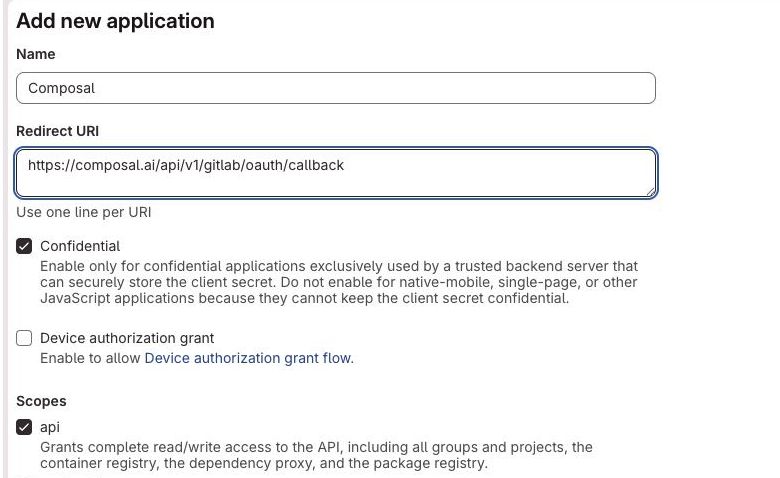
- Name: enter
Composal. - Redirect URI: paste the exact value copied from Composal, including
/api/v1/gitlab/oauth/callback. Use the callback shown by your Composal deployment. - Confidential: keep this enabled. Composal stores the client secret on its backend. Leave Device authorization grant off.
- Scopes: select api. The read-only scopes do not allow Composal to publish MR notes and commit statuses. Then scroll to Save application. GitLab displays the Application ID and Secret after saving; copy both into Composal. Keep the Secret private.
Complete the connection in Composal
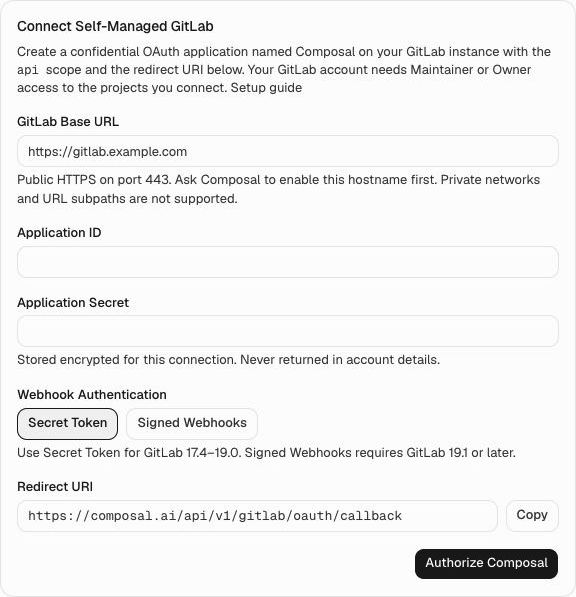
- GitLab Base URL: enter the approved public HTTPS base URL of your instance, such as
https://gitlab.example.com. - Application ID: paste GitLab's Application ID from the saved OAuth application.
- Application Secret: paste that application's Secret. This is the OAuth client secret, not a personal access token or webhook token.
- Webhook Authentication: choose Secret Token for GitLab 17.4 to 19.0 or Signed Webhooks for 19.1+. Composal creates and authenticates the project webhook for you after import and PR Testing setup.
- Copy: use this button to copy the Redirect URI before creating the GitLab application. This value goes into GitLab's Redirect URI, not into a webhook URL field.
- Authorize Composal: continue to your instance's consent screen. Check the instance and Composal application, approve access, then select and import projects. Wait for Ready before configuring PR Testing.
Connections, OAuth refreshes, project links, merge request comments, and commit statuses use the saved instance. When an account needs reconnecting, Reconnect GitLab returns to that same host and application. If you rotate the OAuth application secret, open the self-managed setup form again with the same base URL, Application ID, and new Secret, then authorize with the same GitLab account. Existing project connections retain their identity and webhook mode.
The GitLab account that grants access authors MR notes. For a company-branded author, connect an approved company GitLab account with its Composal name and avatar. Naming the OAuth application Composal does not change the author of notes.
In self-managed CI, set COMPOSAL_GITLAB_HOST to the instance hostname (for example, gitlab.example.com). The generated Copy CI Setup snippet includes this value. GitLab runners need HTTPS access to composal.ai to fetch the template/helper and call Verify, and to the preview being deployed. Use GitLab's Pipelines must succeed setting to enforce the resulting verdict.
Choose who builds previews
Who Builds Your MR Previews? asks where the ready deployment of the MR source commit comes from:
- My CI: deploy the exact MR source commit, wait until its preview is ready, then hand off the URL or a ready Verify environment using the helper below. Add Composal to Your Workflow shows the snippet with Copy CI Setup. Finish setup before running the pipeline; CI can only hand over previews once testing is set up.
- GitLab Review Apps: Composal looks for a non-production environment named after an open MR's branch and turns it into a template such as
review/{branch_slug}. Otherwise choose Enter the Environment Name and fill in Review App Environment, such asreview/{branch_slug}orreview/mr-{mr}.{mr}expands to the MR IID,{branch}to its source branch, and{branch_slug}to GitLab’s lowercase, normalized, 63-character ref slug. Verify uses only an available, non-production environment with a successful latest deployment whose SHA matches the current MR head and an external URL. Use a separate review environment for each MR; a shared environment's newer deployment cannot verify an older commit. - Composal: uses the repository's hosted-app preview profile. Choose Change to pick another Preview Profile or Open This Service. The exact MR source commit must be available in the connected Composal repository. Verify provisions, deploys, and waits for that revision before testing.
Select the affected journeys
Verify assesses changed paths and available hunks against saved project Scenarios. Configure Limits → Skip PRs That Only Change for explicit exclusions, such as docs/** and README.md. A request is skipped only when every changed path, including rename sources, matches those exclusions. See how selection works.
Incomplete file listings cannot qualify for a documentation-only skip. The relevance classifier records uncertainty rather than inventing coverage. Rename sources count as changed paths. Selected Scenarios execute in one parallel grouped Run; unavailable actors and uncertain coverage remain untested.
Use the GitLab CI helper
Include the versioned template in your project's .gitlab-ci.yml, extend .composal-verify, and run it after your deployment job. Store an administrator Composal API token as a masked GitLab CI/CD variable named COMPOSAL_TOKEN. Do not put the token in YAML or artifacts. Protected variables are available only to pipelines GitLab allows to access them; use a dedicated test organization token appropriate for your trusted MR branches. Fork pipelines must not receive it.
include:
  - remote: https://composal.com/ci/verify/v1/gitlab.yml

# Your existing deployment job must deploy CI_COMMIT_SHA and wait for readiness.
# Export its ready URL as PREVIEW_URL in a dotenv artifact.
# deploy-preview:
#   stage: deploy
#   ...
#   artifacts:
#     reports:
#       dotenv: preview.env

verify-preview:
  extends: .composal-verify
  # Keep these rules directly in this file to enable MR pipelines.
  rules:
    - if: '$CI_PIPELINE_SOURCE == "merge_request_event" && $CI_MERGE_REQUEST_EVENT_TYPE == "detached" && $CI_PROJECT_ID == $CI_MERGE_REQUEST_SOURCE_PROJECT_ID && $CI_PROJECT_ID == $CI_MERGE_REQUEST_PROJECT_ID'
  needs:
    - job: deploy-preview
      artifacts: true
  variables:
    COMPOSAL_ORG: my-org
    COMPOSAL_PROJECT: my-project
    COMPOSAL_REPOSITORY: my-composal-repo-slug
    COMPOSAL_PREVIEW_URL: $PREVIEW_URL
GitLab identifies the MR target project with CI_MERGE_REQUEST_PROJECT_ID. The rules require both the source project and MR project to match the pipeline project, keeping the token-bearing job out of fork pipelines.
Replace deploy-preview with your deployment job, set COMPOSAL_PROJECT to the Composal project containing your saved YAML Scenarios, and use the connected Composal repository slug, which can differ from the GitLab project name. The helper uses Node 24 and the final .post stage, reads the MR IID and source SHA from GitLab, requests verification, supplies the ready preview, and waits for its own run. Failed, blocked, cancelled, superseded, and timed-out results fail the CI job. Passed and explicitly skipped runs succeed. Its composal-verify.json artifact contains result links and IDs, without the token or preview URL.
| Variable | Purpose |
|---|---|
COMPOSAL_GITLAB_HOST | Expected GitLab instance hostname; defaults to gitlab.com. Required for self-managed CI. |
COMPOSAL_TOKEN | Administrator API token; masked CI/CD variable. |
COMPOSAL_ORG | Composal organization slug. |
COMPOSAL_PROJECT | Required Composal project slug or ID owning the saved YAML Scenarios and PR Testing configuration. |
COMPOSAL_REPOSITORY | Connected Composal repository slug; defaults to CI_PROJECT_NAME. |
COMPOSAL_IMESSAGE_NUMBER | International iMessage destination of this MR commit. May accompany the URL; requires Messages and exact-pair approval. |
COMPOSAL_PREVIEW_URL | Ready URL serving the exact MR source commit. |
COMPOSAL_ENVIRONMENT | Ready Verify preview environment slug, instead of a URL. Its revision must attest the MR source SHA. |
COMPOSAL_VERIFY_WAIT | true by default. false returns after handoff and does not wait for a verdict. |
COMPOSAL_VERIFY_TIMEOUT | Wait timeout in minutes, 1 to 60; defaults to 15. Verification continues if the job times out. |
Use ordinary detached MR pipelines. Merged-results pipelines and merge trains deploy a synthetic merge commit, so this helper rejects them rather than claiming their preview covers the MR source head. The included job runs only for source branches in the connected project. If you override its rules, the helper still rejects fork pipelines and other pipeline types before calling Composal. Use MR rules for your deployment job too. If your project already defines workflow: rules, allow merge_request_event there and preserve your existing branch and tag rules. Configure workflow rules to avoid duplicate branch and MR pipelines.
For a custom Node-based job, download https://composal.com/ci/verify/v1/verify.mjs and https://composal.com/ci/verify/v1/gitlab.mjs into the same directory, then execute node gitlab.mjs with the variables above. Pin the remote include's integrity hash in GitLab when your organization requires immutable includes.
Use the com CLI or API
Install the CLI. For local use, run com login, then select your organization with com context switch my-org. CI uses its secret store instead of an interactive login: expose the Composal token as COMPOSAL_API_TOKEN, and pass --org and --repo explicitly. See CLI configuration.
Use com verify merge-requests --help to check support for the MR command. The existing pull-requests spelling remains compatible with a configured GitLab repository. The examples use MR 45, organization my-org, and the connected Composal repository slug my-repo.
Start an existing MR using its saved preview source:
com verify merge-requests run 45 --org my-org --repo my-repo \
  --idempotency-key mr-45-review-1 --json
For a CI-owned ready Verify environment, pin the deployed source SHA on the request and handoff:
com verify --org my-org --repo my-repo merge-requests run 45 \
  --head-sha "$CI_COMMIT_SHA" --idempotency-key "gitlab-$CI_PIPELINE_ID" --json

com verify --org my-org --repo my-repo merge-requests preview 45 \
  --head-sha "$CI_COMMIT_SHA" --environment mr-45 --json
run creates a verification request using the saved preview source. In CI, --head-sha refuses an outdated pipeline before it can request a newer revision. Run preview only after its Verify environment is ready and records the full deployed SHA in source_revision. Keep that preview alive through browser execution and cleanup. Reuse an idempotency key to retry an uncertain response; use a new key for an intentional rerun.
Inspect the stable MR ID returned by run, then read its grouped Scenario Run when one exists:
com verify merge-requests get <mr-id> --org my-org --json
com verify runs get <test-run-id> --org my-org --project my-project --json
A successful submission means accepted. The verification request ID and grouped test Run ID are distinct. Use the GitLab CI helper's default waiting behavior to gate a job, or inspect the Run's product outcome and separate cleanup state. Skipped and blocked requests can finish before a grouped Run exists.
The API also exposes POST /api/v1/organizations/{org}/verify/merge_requests, POST .../merge_requests/preview, GET .../merge_requests/{id}, and POST .../merge_requests/{id}/rerun. These routes require a GitLab-configured repository. The request and preview fields match the corresponding pull_requests endpoints. A stale head returns HTTP 409 and cannot hand a preview to a newer run.
Read results and protect merges
Composal maintains one MR note with selection, the tested source commit, outcomes, problems, and links to protected recordings and complete run history. Notes are written as the GitLab account that connected the project; reconnect with that account to retain ownership of its result note. MR !45 and the GitLab group/project identify the source throughout Verify.
The Composal Verify commit status follows the latest run for each source commit. Queued and preview-waiting runs are pending; browser runs are running; passed runs succeed; failed or blocked runs fail; superseded or cancelled runs are cancelled; explicit skips are skipped. When the MR has a matching source pipeline, the status is attached to that pipeline.
For merge protection, enable GitLab's Pipelines must succeed project setting and keep verify-preview blocking with COMPOSAL_VERIFY_WAIT: "true". Verify does not change your project's merge policy. Skipped pipeline behavior depends on your GitLab project settings. Do not override the job with allow_failure: true if its verdict should block merging.

- Open your GitLab project's Settings → Merge requests → Merge checks, enable Pipelines must succeed, and choose Save changes. Some older versions place these controls under Settings → General → Merge requests. Review the separate skipped-pipeline policy for your project. Keep the CI helper's waiting behavior enabled so a failed Verify run fails the pipeline.
For Self-Managed instances, also set COMPOSAL_GITLAB_HOST to your instance hostname in .gitlab-ci.yml (without https:// or a path). Put COMPOSAL_TOKEN in Settings → CI/CD → Variables as a masked secret, then use the CI helper configuration above. A successful setup has a Ready repository import, a completed Verify run, one updated Composal Verify MR note, and a matching pipeline verdict. Test one passing and one intentionally failing journey in a disposable project before relying on the merge gate.
Resolve GitLab setup and CI problems
| What you see | What to check |
|---|---|
| Configuration has no GitLab project | Confirm GitLab is enabled for your organization, the project import is Ready, and the connecting account retains administrator access in Composal. |
| GitLab Review App never appears | Check the environment name or pattern, non-production tier, available environment, successful latest deployment, exact MR source SHA, and external_url. |
| Waiting for preview | Deploy the current MR source SHA and supply its ready target, or finish the configured Composal preview rollout. After one hour, request a rerun once the preview is ready. |
| Stale or conflicting handoff | Use the current MR head. Retry the same target for the same request; request a new run to intentionally change targets. A stale head returns HTTP 409. |
| CI token is unavailable | Check masked/protected variable access for the trusted MR branch. Fork pipelines must not receive the token. |
| OAuth redirect mismatch | Copy the Redirect URI from the Composal form exactly into the application on the same GitLab instance. |
| Instance needs to be enabled | Ask Composal to approve the exact hostname. Wildcards and customer-supplied approval are not accepted. |
| GitLab URL is refused | Use a publicly reachable HTTPS base URL on port 443. Private DNS addresses, URL subpaths, and untrusted certificates are unsupported. |
| Webhooks return 401 | Check the saved authentication mode against your GitLab version; repair the hook by saving PR Testing settings. Signed mode never accepts a plain token. |
| Helper rejects the pipeline | Set COMPOSAL_GITLAB_HOST to the self-managed hostname, then use detached MR pipelines in the connected source project. Merged-results pipelines and merge trains use synthetic merge commits. |
| Missing results note or commit status | Check OAuth connection health, the connecting account's GitLab permissions, and the configuring user's Composal administrator access. Reconnect with the same GitLab account to retain note ownership. |
| Login or access blocker | Check preview visibility, personas, and credentials before treating the result as an application defect. |
| CI wait timed out | Open the returned run-history link. The server run continues; increase the helper and job timeouts for later runs. |
merge-requests is unrecognized | Install the current CLI or use the compatible pull-requests spelling. |
Continue with the Source Control overview, scenario setup, or preview hosting guide.